I've spent a lot of time testing various tools, IDEs, models and workflows and I've landed on something I'm genuinely happy with. It's not perfect, nothing is, but it's the best I've found so far. Prompts hit, or exceed my expectation 9/10 times. This is my personal experience.
First, let's talk about context
Before we get into the tools I want to explain something that fundamentally changed how I work with AI. Context.
When you start a new chat with an LLM, you start with nothing. A blank slate. Each message you send gets appended to the conversation and the entire thing gets sent back and forth, growing in size with every turn. This is your "context window" and it has a limit. This is why long conversations tend to go off the rails. The AI is losing the earlier context that was guiding it.
Why this matters
LLMs are just math. Seriously. Without context they're essentially trying to solve for X when they've got Y and Z, but Z is undefined. The more relevant context you can give the AI about your project, your codebase, your intent, the better the output. It's really that simple.
This is why starting a fresh chat and saying "fix my code" with no other information gives you terrible results. The AI has no idea what your project looks like, what framework you're using, what the bug actually is, or what you've already tried. You've given it an equation with too many unknowns.
These are my must-haves on every project
MCP Tools
MCP stands for Model Context Protocol. It's essentially a way to give the AI additional tools it can call upon during a conversation. Think of them as plugins. Here's what I run with on every project:
Serena
Serena is a coding agent toolkit that gives the AI IDE-like capabilities. Instead of reading entire files and doing plain text searches, Serena lets the AI understand your code at the symbol level. It can find functions, classes, references and navigate your codebase the same way a developer would using an IDE's "Go to Definition" or "Find References".
In simple terms, it makes the AI smarter about your code. Rather than dumping an entire file into the context window (eating up that whiteboard space), Serena lets the AI surgically find exactly what it needs. This means less wasted context and higher quality output, especially on larger projects.
Context7
Context7 is a documentation lookup tool. When the AI needs to reference how a specific library or framework works, Context7 fetches the latest documentation and feeds it directly into the conversation. No more hallucinated API methods that don't exist. No more outdated syntax from two major versions ago.
This is especially useful when working with frameworks that update frequently. Instead of the AI guessing based on its training data, it pulls the actual current docs.
Github →
Read-only database MCP tool
I also run a read-only database MCP tool connected to my project databases. This gives the AI direct visibility into my database schema, table structures, and relationships without the risk of it modifying any data. When I'm building queries or working on models, the AI can look at the actual schema rather than me having to describe it or paste it in manually. More context, less effort.
Note: Do not give the AI access to production databases, with real user data.
Setup
Place a .mcp.json file in the root of your project directory
{
    "mcpServers": {
        "serena": {
            "command": "uvx",
            "args": [
                "--from",
                "git+https://github.com/oraios/serena",
                "serena",
                "start-mcp-server",
                "--project-from-cwd"
            ]
        },
        "context7": {
            "command": "npx",
            "args": [
                "-y",
                "@upstash/context7-mcp@latest"
            ]
        },
        "postgressql": {
            "command": "npx",
            "args": [
                "-y",
                "@modelcontextprotocol/server-postgres",
                "postgresql://user:[email protected]:5432/database"
            ]
        }
    }
}
Custom Skills
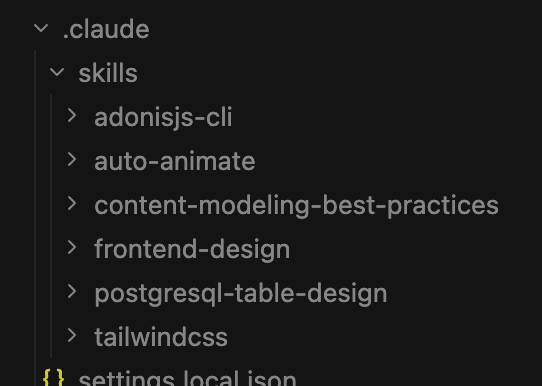
Skills are like instruction sets you can give the AI. They contain best practices and specific guidelines for producing certain types of output. I keep a few standard ones loaded:
Frontend-design — Contains guidelines for creating clean, production-grade frontend interfaces. This stops the AI from producing generic looking UIs and pushes it towards more polished, professional output.
Auto-animate — Guidelines for implementing animations and transitions. Keeps things smooth and intentional rather than the AI throwing `transition: all 0.3s ease` on everything.
Content-modeling-best-practices — Helps structure data and content models properly, especially useful when setting up CMS-driven projects or designing database schemas.
Tailwindcss-Development — Specific patterns and best practices for Tailwind. This prevents the AI from mixing up utility classes or using outdated patterns.
Tip: You can find tons of great skills available for free at SkillsMP
Setup
As I use Claude Code I would create a .claude/skills directory within the root of the project and place the extracted skills within there.
Using it all together
Here's what a typical workflow looks like. I open my terminal, navigate to my project directory and start Claude Code. Before I even ask it to write a single line of code, I start with a plan.
Initial prompt tips
Your first message matters more than any other. This is where you set the context for the entire conversation. I always include:
- What the project is and what it does
- What I'm trying to build or fix in this session
- Any constraints or preferences (framework, style, approach)
- Reference to any relevant files or areas of the codebase
- Tell it to set rules
A good first prompt might look something like:
I'm working on a Laravel application that manages inventory.
I need to add a new feature that allows bulk importing products via CSV upload.
The existing Product model is in app/Models/Product.php and the
current product creation flow is in app/Http/Controllers/ProductController.php.
Use Serena to understand the existing codebase structure before making changes.
Check Context7 for the latest Laravel documentation on file uploads and queue jobs.
Remember to follow the DRY principle as a rule, reusable components and functions.
Always use plan mode first
Before the AI writes any code, get it to plan. Ask it to outline its approach, what files it'll touch, what the data flow looks like. Review the plan, adjust it, then give the go-ahead. This is the single biggest improvement you can make to your workflow. It's much easier to correct a plan than it is to correct hundreds of lines of code.
Tell it when to use tools and skills
The AI doesn't always know when to reach for its MCP tools or skills. Be explicit. If you're working on a frontend component, tell it to reference the frontend-design skill. If you need it to understand existing code, tell it to use Serena. If it's using a library you know it might hallucinate, tell it to check Context7 first. You're the driver. The AI is a very capable passenger who can navigate, but you need to tell it where to look.
Tell it to use the DRY principle (Don't Repeat Yourself)
Spending most of my time with NodeJS, Vue or React I'm quite used to reusable components and functions. This becomes a vital part of the context and rules for the AI to remember. Your model won't be recreating seperate functions for seperate components. It will lean into the DRY principle and make everything re-usable leading to cleaner, more maintainable code, which in turn leads to fewer tokens.
The Kicker: Telling the AI when it's wrong
This is probably the most critical piece of advice I can give you and I don't see enough people talking about it.
AI models are designed to keep you happy. They're trained to be helpful, agreeable and to produce output that looks correct. When the AI does something wrong or takes a bad approach, its natural tendency is to double down and make the incorrect solution look more convincing.
Here's where it gets dangerous. If the AI introduces a bug or makes a bad architectural decision and you don't explicitly tell it that it's wrong, it treats that mistake as established truth. Every subsequent message builds on top of it. It's like building a house on a cracked foundation. The further you go, the worse it gets. Three messages later you've got a tangled mess and you can't figure out why the AI isn't producing decent solutions anymore.
What to do instead
When you spot something wrong, stop. Tell the AI directly:
That approach is wrong. The function you wrote for handling the CSV
import doesn't account for duplicate entries. Remove that implementation
and start fresh with an approach that checks for existing products
by SKU before inserting.
Be specific about what's wrong and why. Don't say "this doesn't work" — say "this doesn't work because X, remove it and try Y instead." The more direct you are, the better. You're not hurting its feelings, it doesn't have any. You're correcting the equation.
Remember, going back to the math analogy, if the AI made an incorrect assumption and you don't remove it from the equation, every answer that follows will be wrong. The AI will keep "solving" with that bad variable included.
That's my process and setup.
It's not the most complex workflow in the world but it works. Good model, good context management, the right MCP tools to extend its capabilities, and the discipline to correct it when it goes off track.
Final Tip: Pair these tools with a batteries included framework like AdonisJS. Make sure to tell the AI model to use as much of the built in features as possible, and to not try "roll your own" solutions.
If you've got a setup that works well for you or ideas on improving this one, I'd love to hear about it. Hit me up on
@Sudo_Overflow.